

OpenAI has once again disrupted the conventional way of reaching customers. First, it introduced two-way conversational engagement through ChatGPT, and now they have come up with Business Hub, a platform where your businesses can claim their listings. Once you claim your business, you can unlock a new set of powerful features. These features include a business agent that answers customer questions about your business, metrics that show how customers engage with you, and options to edit your business information on ChatGPT.
What’s New in AI-Powered Business Discovery?
Before we proceed to list your business, let's dive into how ChatGPT works. Customers ask ChatGPT about a product or service related to your business. ChatGPT returns relevant results and may provide links or citations to a few businesses. When customers click on those citations, they are redirected to the business’s website on Google. However, with ChatGPT Business Hub, a new way of engaging with customers was introduced on Nov. 10th, 2026.
Now, when ChatGPT cites a business, customers can click on the listing to view its business profile directly within ChatGPT rather than being redirected to Google. This is a breakthrough for all types of businesses, whether big or small. OpenAI has mentioned that approximately 1.2 billion people use ChatGPT each week, so if your business does not have a profile on ChatGPT, you might lose a ton of sales. So, how do you get your business listed on ChatGPT? Read on
Steps to get your business listed on ChatGPT
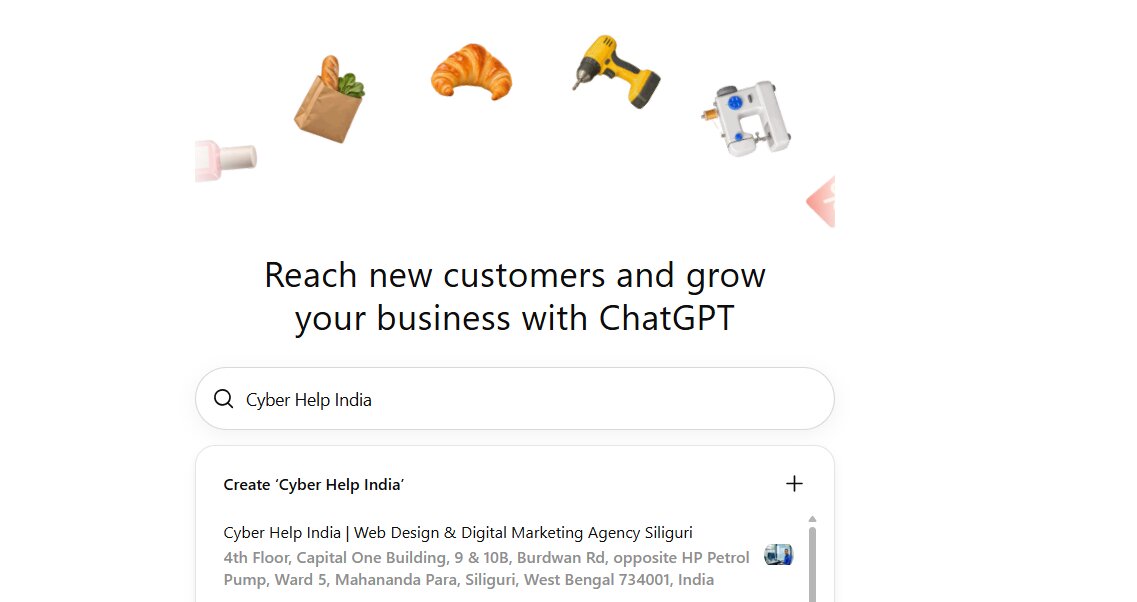
We have provided screenshots of the steps that we followed while registering our firm, Cyber Help India, with ChatGPT. These screenshots will help you in claiming your own listing.
1. Visit the OpenAI Business Hub main page and click the button that says “Claim Your Business”, or you can click on the official URL: https://chatgpt.com/business-hub
2. This will open the Business Hub page inside ChatGPT.
3. Type the name of your business inside the search box. If your business is not listed, just click Create.

4. Next, click Get Started.
5. It now asks how customers reach you. You can choose a physical location or an online store.
6. Then add your website.
7. Now, ChatGPT wants you to prove that the business is legitimate and the website is really yours. Thus, it gives you a small piece of text called a TXT record. It has three parts: a type, a name, and a value.
8. Add the required fields to your domain's DNS settings.
9. You will find these settings in the account where you bought your domain.
10. Then come back to ChatGPT and click Verify Domain. You will get a verified business profile, analytics, a business agent, and business information.
11. Your business profile in ChatGPT has been created. For businesses in India, this service is not available. You can start the process to get the early bird advantage.

12. The next step is to verify your identity with a government ID like a passport.
For more clarity on ChatGPT Business Hub, you can refer to this video by OpenAI –
https://openai.com/index/introducing-businesses-chatgpt/
NOTE: For countries outside the USA, including India, this service is not yet available. Thus, if businesses try to get listed, they are being kept on the waitlist.
Benefits of Claiming Your Business in ChatGPT
When you claim your business in ChatGPT, it starts getting reflected in ChatGPT. You also get some additional benefits, which are mentioned below.
- You can build, test, and launch your own Business Agent that answers queries from customers about your business on your behalf.
- You get insights on how your business is engaging with customers. These insights include the number of mentions and website clicks that your business receives. This is exactly like Google Search Console.
- You can also explore themes and topics around which your business is being mentioned. This will help you optimize your website and content around those themes and topics.
- You can also sponsor your business agent and use it as a destination for ChatGPT ads to attract more customers.
Google Business Profile Vs ChatGPT Business Hub
While both Google Business Profile and ChatGPT Business Hub let you control how your business appears on their respective platforms, they do not replace each other. To understand this, knowing the differences between them is crucial, so we have listed these differences below –
Basis of Difference | Google Business Profile | ChatGPT Business Hub |
Primary purpose | It targets local maps, directions, and direct calls on Google Search and Maps. | It manages brand details, product feeds, and AI mention tracking. |
Availability and access | Free and open to verified local or service area businesses. | It is currently in beta (no fee) for eligible business owners with a website via verification methods like phone, email, DNS, or Shopify. |
Performance tracking | It highlights website visits and other metrics like calls and direction requests. | Tracks last 28-day AI mentions and discovery topics. |
FAQs
1. What is ChatGPT Business Hub?
ChatGPT Business Hub lets your business connect with customers by creating a profile of your business on ChatGPT. By doing this, ChatGPT can list your business or brand directly on its platform when customers ask for information about products or services that are similar to your business.
2. What features are available on ChatGPT Business Hub?
When you claim your business on ChatGPT Business Hub, you can build, test, and launch your own Business Agent. You can also monitor metrics like AI mentions and clicks on your business. Additionally, you can explore the themes and topics around which your business is being mentioned by ChatGPT.
3. Is ChatGPT Business Hub available for businesses in India?
Currently, the listing of businesses on ChatGPT Business Hub is available only in the USA. Businesses in India and other countries are being put on the waitlist. You can start this process for your business and get it listed as soon as it becomes available in India.
4. Will ChatGPT Business Hub replace Google Business Profile?
As of now, ChatGPT Business Hub will not replace Google Business Profile. In its current form, ChatGPT will highlight brand details, product feeds, and AI mentions. It will not manage local maps, directions, and direct calls to businesses, which is currently Google's portfolio.
